Connect & ingest
Server-side requests retrieve Workday custom-report data. Date-window controls support labor imports and backfills, while credentials stay in the server environment.
API integrations, databases & automation
Custom API integrations, PostgreSQL databases, and connected reporting. Practical experience bringing Workday data into project controls, with access and operational visibility designed into the workflow.
Discuss your projectA useful starting point
Start with the manual handoff: exporting a spreadsheet, copying records, or reconciling two tools. Integration scope depends on each system’s API, access permissions, and update limits. Those are checked before implementation.
Selected work / Workday integration
I built a Workday-to-PostgreSQL integration that brings workforce, project, labor, contract, and invoice data into a project-controls application. The work spans the API connection, data model, reconciliation, and reporting experience.
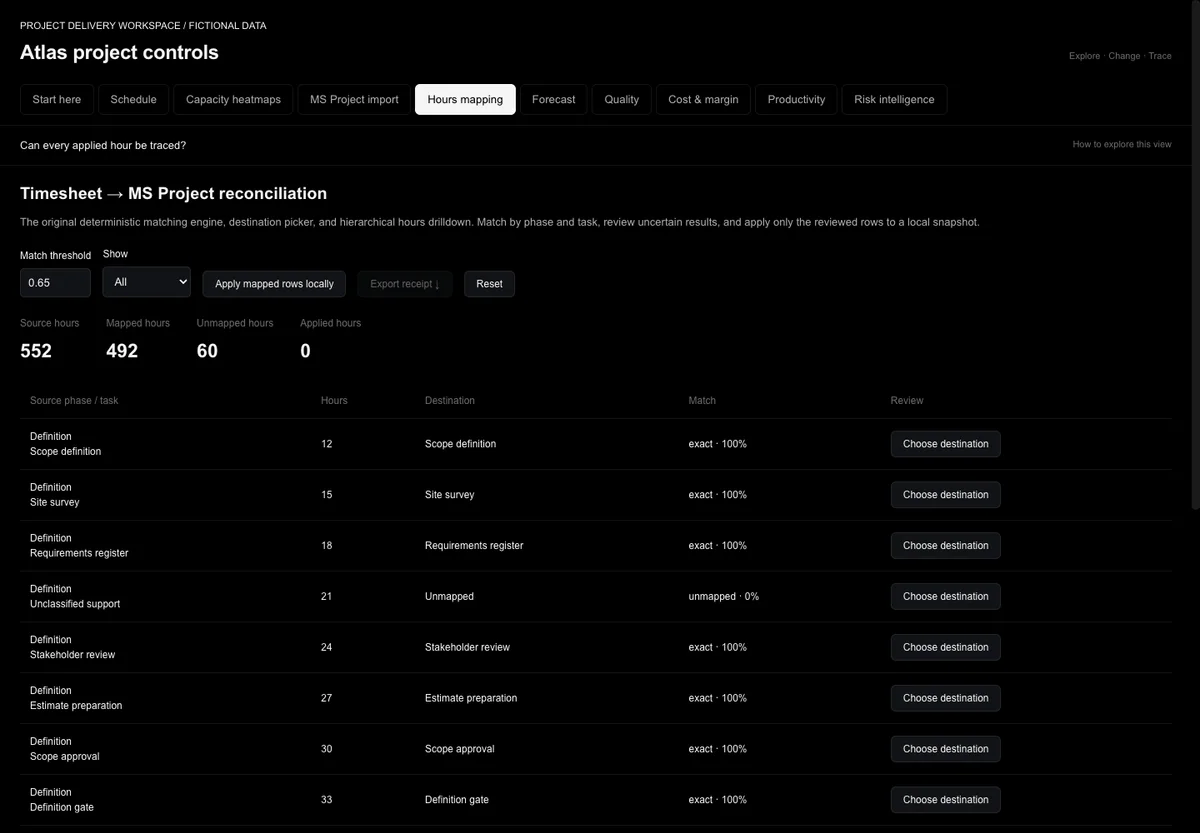
Server-side requests retrieve Workday custom-report data. Date-window controls support labor imports and backfills, while credentials stay in the server environment.
Mapping functions turn source reports into application records. PostgreSQL tables preserve relationships between people, projects, phases, hours, contracts, and invoices. Duplicate handling and conflict-aware updates support repeat imports.
Source time entries are matched to the project hierarchy. Unmatched work remains visible for review, and mapped actuals feed cost and productivity reporting. A useful dashboard needs a traceable path back to its inputs.
Sync-run history records status, timing, row counts, and errors. Connection-health tracking distinguishes the latest attempt from the last successful update, giving the operator a place to investigate stale data.
The integration described above is work I built. The public demo shows an adapted reconciliation workflow with synthetic data; it does not connect to Workday or a client database. Client identities, report addresses, credentials, and operational records are omitted. Workday is the source platform, not a claimed partnership or endorsement. Refresh timing depends on the configured sync process.
See how source records become usable project actuals.
Try the reconciliation demo ↗The data foundation
Define how records relate, which system owns each field, and how updates reach the application. The model should support both everyday reporting and the questions that follow it.
Access & security
My application work includes authentication guards and project-scoped access checks. For each engagement, I define access boundaries alongside the API and database design, then test the agreed behavior.
Application security engineering is part of the implementation scope. Independent penetration testing and formal compliance certification are separate specialist engagements.
How we work
Map the current process, the people involved, and the result you need.
Test a useful first version with your real inputs. Resolve the details together.
Receive the agreed files, documentation, and walkthrough. Define support before launch.
Start a conversation
Send the problem, the starting point, and the deadline. We’ll define a useful first deliverable together.
Discuss your project